How to use AlgoSleuth to Check for Google Panda & Penguin Problems

We get a lot of requests from businesses that have lost website traffic as a result of Google Panda or Google Penguin updates. They’re not sure when, or why they lost the traffic; they just suspect Google Panda or Google Penguin of causing it. For some, gauging any negative effects as a result of Panda and Penguin was a guessing game. Now, thanks to Delegator’s AlgoSleuth, you can find out where you lost traffic.
The function of AlgoSleuth is simple. If you have a Google Analytics account, you can use AlgoSleuth to find out how much traffic you had 30 days before a Google update, and 30 days after an update. So if you lost a significant amount of traffic after one update, there’s a good chance that you were hit with Panda or Penguin.
Want to know why you lost traffic from an update? No problem! AlgoSleuth includes a brief description of what was employed with each update. While no one outside of Google can tell you exactly what an update does, there are still some helpful hints available, which AlgoSleuth has included in this report. There are also some links to provide you with additional information should you need it.
Here’s how to use AlogoSleuth.
- Make sure you’re logged into Google Analytics.
- Open the AlgoSleuth website, then click “Get it for free”
- Click File, and make a copy of the spreadsheet.
- Go to Tools, then Script Gallery. Install “GA API”.

- A Google Analytics tab should now appear on your screen. Click on this tab, and select “Find profile/ids”. An authorization window will appear. Click “OK”. Then select “Grant Access” when prompted.
- Go back to the Google Analytics tab, and select “Find profile/ids” again. Select the account, web property, and profile of your choice. Then highlight and copy your ga number, under ids. (Make sure you also include the “ga:”)
- Paste the ga number in cell C23.
- Go back to Google Analytics once again, and click “Get Data”. The following window should appear, letting you know you’re done.

- To access your results, click on the AlgoSleuth Data tab at the bottom of the page.
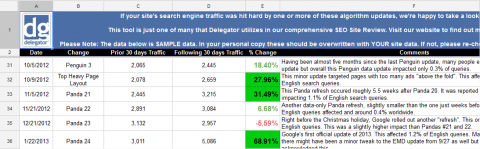
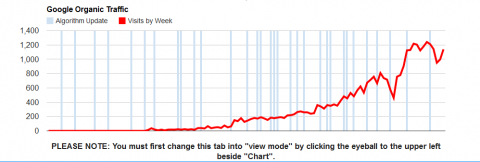
Now you can find out exactly which Google Panda and Google Penguin updates may have affected your site’s traffic. Should you want to export your results, you can do so by clicking file>Download As. Then simply choose the type of file you’d like to save the data with. You can also see a graph of your data with the AlgoSleuth Graph tab. A graph of our data is displayed below.