
October 9, 2013
How to Be an Admin On a LinkedIn Company Page
It’s difficult for one person to manage every social platform for their small business. Delegating these roles is vital to keeping everyone sane. Beyond this, regular updates are a way to grow your reach, leads and conversions. Not surprisingly, a client recently asked us how to make an employee a LinkedIn company page admin.
Making Someone a LinkedIn Company Page Admin
- Have the employee follow the company page on LinkedIn. First they should log in to LinkedIn. Next, visit your company page and click “follow” in the upper right corner. Once the employee is following the account a check and the word “following” will appear.

- Have a current page admin login and edit the user settings. A current company page admins will click “Edi in the upper right corner next to “Following”.
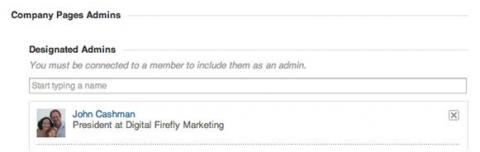
- Make the employee an LinkedIn company page admin. From the edit page find the section labeled “designated admins”. It is about a quarter of the way down the page. Type the full name of the person you want to be an admin. Their profile will pop up. Click on it and they will become a designated admin.

- Make the changes live. Click “Publish” in the top right of the page.
Now the employee is a designated admin on your LinkedIn company page.