
How to Create Awesome Facebook Ads
 The the number two website in the world is Facebook with one billion user worldwide. Naturally, with so much website traffic, the ads on Facebook can be a worthwhile investment for any business local or Fortune 500. One of the best ways to set up a Facebook ad campaign is to build a campaign that builds upon itself so that not only are you building audience, but you are also building awareness of your posts so more people see them and potentially click and visit your site.
Start with the basics
The first and most important thing in building a Facebook campaign is to understand your core audience and your own business. Are you selling online and shipping in the U.S.? Are you a bricks and mortar store only selling product in a certain zip code or area? What are you selling and in what industry? Who are your core customers? Women? Young? Single? etc. Once you understand what you are selling and to whom you can start setting up a Facebook campaign.
Step 1 – Build Audience
The first thing to do is build an audience. It doesn’t matter if you have the world’s greatest post if you don’t have someone to see it. So the start of any Facebook campaign is to build your core audience of people who are interested in what you have to say. Facebook makes this pretty easy to do.
- Login to Facebook and go to your page and click create ad.
- Choose your Facebook page.
- Choose Get More Page Likes.
- Write your clever ad.
- Choose sponsored stories, friends of your audience will now see your ad.
- Choose your audience. This is where you are selling your services and what your audience is interested in.
- Name your campaign and add your campaign budget. You can bid as little as a dollar a day.
- Click save.

Your campaign will take about ten minutes to get approved. In the mean time you can start building your awareness of your messaging.
Step 2 – Build Awareness
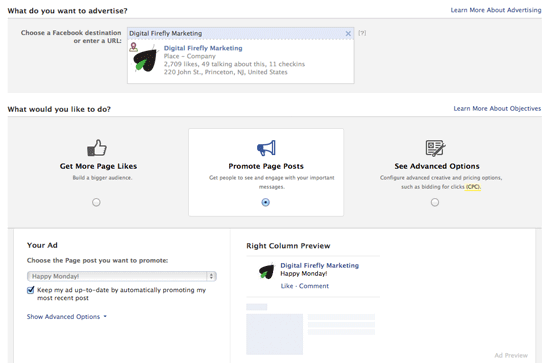
Once you have a audience building campaign set up, it’s also time to set up a campaign that is able to show your posts to your audience. While your posts are able to get organic views within the Facebook News Feed, it can be advantageous to have your posts viewed along the left hand side of Facebook as well. This will not only show your posts to your audience but their friends as well. Again, Facebook makes this pretty easy to do.
- In Facebook Ads, click create ad.
- Choose your Facebook page.
- Choose Promote Page Posts
- Click your last page post and check the box that says “Keep my ad up to date by automatically promoting my most recent post”
- Choose Connections – People who are connected to you and Target people who are also connected to your brand
- Use an existing campaign which will be a drop down box.
- Click Place Order
Using this step means that you should be posting to Facebook once per day. This can be done using the Facebook scheduling feature, which allows you to set a number of posts six months into the future.
You can let your Facebook ad campaign run on auto pilot, checking it every week and making some adjustments. Using this method will not only help you build your audience but also build awareness of your brand and create a large and engaged audience.